 EN
A printer that treats the bottle as the substrate, not the label
Most packaging decoration still revolves around a two-step logic: produce the container, then apply something to it. A pressure-sensitive label, a shrink sleeve, a screen-printed layer of ink, a pad-printed logo. The bottle gets made, and decoration arrives afterward as a separate operation with its own setup time, its own waste stream, and its own minimum order quantity.
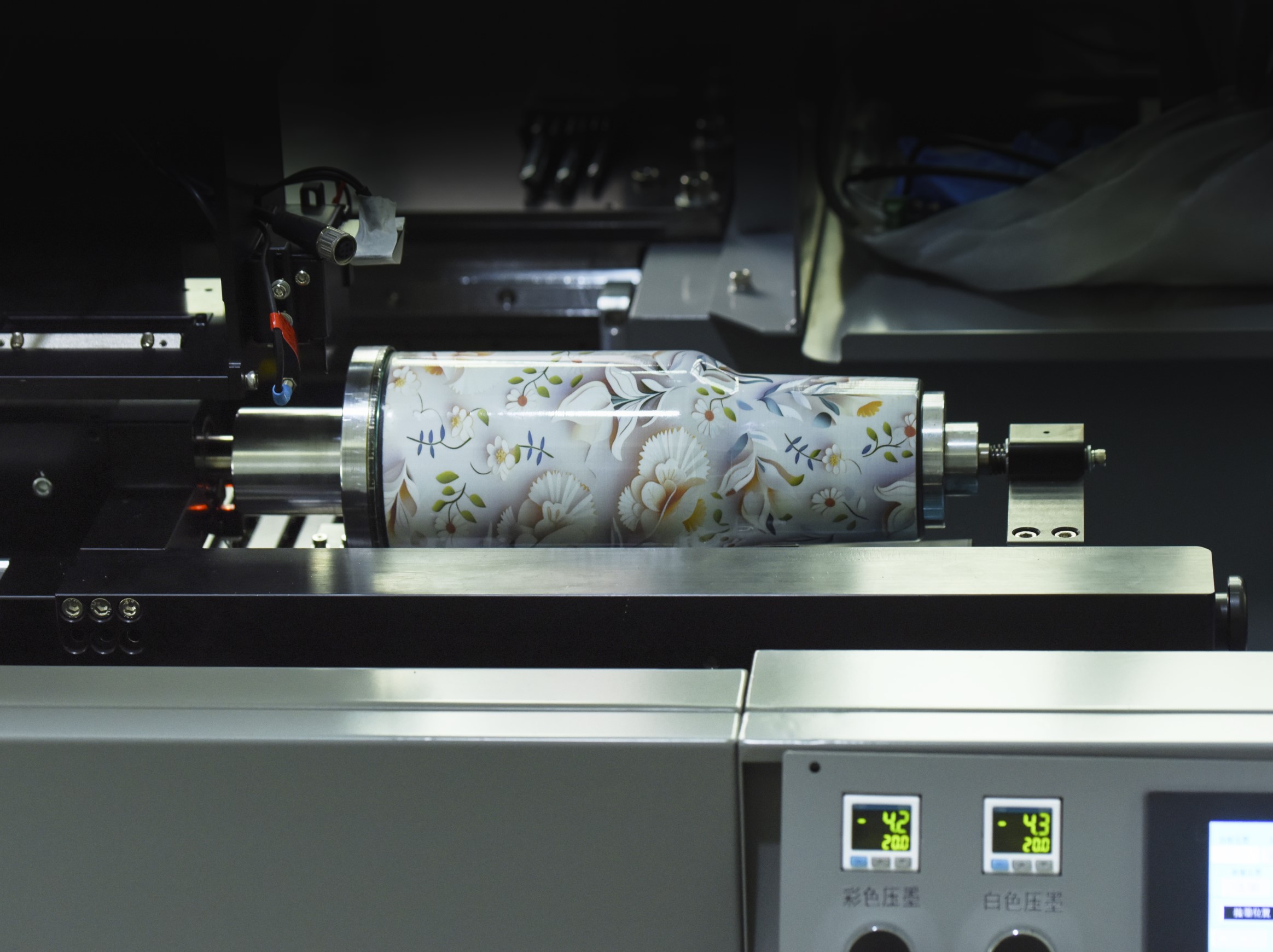
A bottle inkjet printer collapses that sequence. It is a direct-to-object digital printing system built to fire ink straight onto the curved exterior of a container while the container rotates in a controlled fixture beneath a printhead. No plate, no screen, no label liner. The image lives in a file, and the machine translates that file into droplets synchronized with the rotation of the part.
For packaging teams accustomed to tooling-driven decoration, the shift is less about print quality and more about what happens before the first saleable unit comes off the line.
The mechanics: rotation, timing, and a printhead that never touches the surface
The core engineering problem is deceptively simple: a bottle is round, and a printhead is flat. The solution is not to flatten the bottle, but to move it in a way that lets a stationary row of nozzles lay down a coherent image across a cylindrical surface.
A typical rotary setup holds the container on a mandrel or a set of rollers. The printhead sits at a fixed distance, usually a few millimeters off the surface, and fires ink as the part turns. The machine’s controller synchronizes nozzle firing with the angular position of the bottle, so a seam does not appear where the artwork closes. On UV-curable systems, an LED lamp cures the ink within milliseconds of landing, which means multiple layers (primer, white, color, varnish) can be stacked in a single pass without the part leaving the fixture.
The “inkjet” part matters more than the “bottle” part for anyone evaluating the technology. Drop-on-demand printheads can place picoliter-scale droplets with enough precision to reproduce gradients, fine type, and variable data that changes from one unit to the next. A QR code on bottle number one can be different from the QR code on bottle number four thousand, and no tooling change is required.
Where the economics actually turn, and where they do not
The cost conversation around bottle inkjet printing is often oversimplified into “digital is cheaper for short runs.” That statement is directionally correct, but the useful version has more texture. Digital cylinder printing eliminates the plate or screen that screen printing and pad printing require, so the setup cost drops to near zero. Screen printing, by contrast, spreads a fixed preparation cost across the run, which means its per-unit cost falls as volume rises. The crossover is not a single number, but a range shaped by artwork complexity, color count, and how often the design changes.
A practical comparison from production-oriented buying guidance looks like this:
| Factor | Digital bottle inkjet | Screen printing on bottles |
|---|---|---|
| Setup per design | Load file, load part | Screen making, color mixing, registration |
| Economic volume sweet spot | Roughly 1 to 2,000 units | 2,000 units and above |
| Design change | Instant, no tooling | New screens required |
| Variable data per unit | Native capability | Impractical in a per-screen workflow |
| Color range | CMYK plus white and varnish, gradients and photos | Spot colors, constrained by screen count |
| Ink film character | Thin, depends on primer and varnish | Thick, inherently durable |
The honest reading is that these are not competing for the same job. A beverage line running one label design across hundreds of thousands of identical glass bottles will usually stay with screen or ceramic decoration because the per-unit economics reward repetition. A co-packer handling seasonal SKUs, limited editions, personalized gift sets, or regional test batches sits in a different economic reality, and that is where direct digital bottle printing earns its place.
The problem nobody warns you about: glass is not a perfect cylinder
The brochure version of bottle inkjet printing assumes a clean geometric cylinder. Real containers do not cooperate. Glass bottles, in particular, carry dimensional tolerances from the forming process that are invisible to the eye but significant at print resolution. Outer circumference varies, and the bottle mouth is not always perfectly concentric with the body. When a bottle with eccentricity rotates in front of a printhead, the surface speed at the print zone is not constant. Some portions of the sidewall pass the nozzles faster than others, and the result is banding, density shifts, or a print that looks fine on one side and soft on the other.
A case from a glass bottle decoration retrofit in a southern China facility illustrates the point. The project started with a straightforward brief: replace a label applicator with direct UV inkjet on a 360-degree rotary fixture. The first samples looked excellent on the lab bench, where bottles were hand-selected and spun at a steady rate. On the production line, using bottles from the same supplier but a different pallet, the same print file produced visible density variation on roughly one in seven bottles. The issue was not the printhead or the ink. It was the tolerance stack: the fixture was rotating at a fixed angular velocity, but the glass surface was presenting a different linear speed to the nozzles depending on the local radius at the print zone.
The fix required the machine to measure surface velocity at the print position and adjust firing timing on the fly, rather than assuming a perfect cylinder. That kind of closed-loop compensation is now part of the more capable rotary platforms, but it is a reminder that bottle inkjet printing is a handling discipline as much as a printing discipline. Containers that are not rotationally symmetrical, or that have seams, parting lines, or pronounced tapers, raise the difficulty further.
Materials, adhesion, and the regulatory layer that sits underneath the print
A print that looks sharp on day one is not the same as a print that survives filling, capping, labeling, shipping, and a chilled retail shelf. Adhesion is the quiet variable that separates a demonstration from a production process.
UV-LED inkjet is the dominant approach for cylindrical work because it cures instantly and can be formulated for a range of substrates, from glass and metal to PET and PP. Glass typically needs a flame treatment or a primer to achieve a durable bond. Low-surface-energy plastics such as PET and PP often require plasma or corona treatment before ink will anchor properly. The primer and varnish layers in a digital workflow are not cosmetic extras. They do part of the adhesion and durability work that a thick screen-printed ink film handles through sheer film build.
The regulatory layer adds another dimension, particularly for food, beverage, and pharmaceutical containers. In the United States, the Food and Drug Administration does not “approve” specific printing inks as products. Instead, ink components that may become indirect food additives are evaluated against the food additive provisions in Title 21 of the Code of Federal Regulations, roughly Parts 170 through 190. For packaging teams, the practical implication is that the ink supplier’s documentation and the converters’ process controls matter as much as the printer specification. A machine that can hit 1200 dpi is not automatically a machine that belongs on a food-contact packaging line.
What this technology is good at, and where a different tool still wins
Bottle inkjet printing is strongest when the job involves change. Short runs, multiple SKUs, regional variants, promotional packaging, serialized codes, and personalized containers all play to the strengths of a digital direct-to-object workflow. The absence of plate or screen costs means a design revision is a file edit, not a tooling cycle. Variable data is native rather than bolted on.
The limitations deserve equal billing. Throughput on a single rotary fixture is not comparable to a high-speed screen line running one design for months. Ink film durability depends heavily on substrate preparation and primer selection, and some aggressive filling or sterilization processes may still favor a thick screen-printed or ceramic decoration. Not every bottle geometry is a good fit. Pronounced shoulders, deep tapers, and handles create print-distance changes that challenge even a well-tuned rotary system.
For packaging operations that live in the space between mass repetition and constant variation, a digital bottle printer is less a replacement for conventional decoration than a second production mode. It covers the jobs that cannot justify tooling, and it does so with a print quality that no longer requires a caveat.
At the equipment end, NOVA has built its bottle inkjet platforms around this exact tension between flexibility and production reliability, with rotary, single-pass, and AI-assisted scanning configurations aimed at different container families. The manufacturing and quality-control side of the operation matters here because a direct-to-object printer is only as consistent as the fixture that holds the bottle and the supply chain behind the ink and spare parts. For teams evaluating a first or second digital line, that operational depth is often the difference between a machine that runs and a machine that sits.
Table of Contents
- A printer that treats the bottle as the substrate, not the label
- The mechanics: rotation, timing, and a printhead that never touches the surface
- Where the economics actually turn, and where they do not
- The problem nobody warns you about: glass is not a perfect cylinder
- Materials, adhesion, and the regulatory layer that sits underneath the print
- What this technology is good at, and where a different tool still wins