
 EN
EN
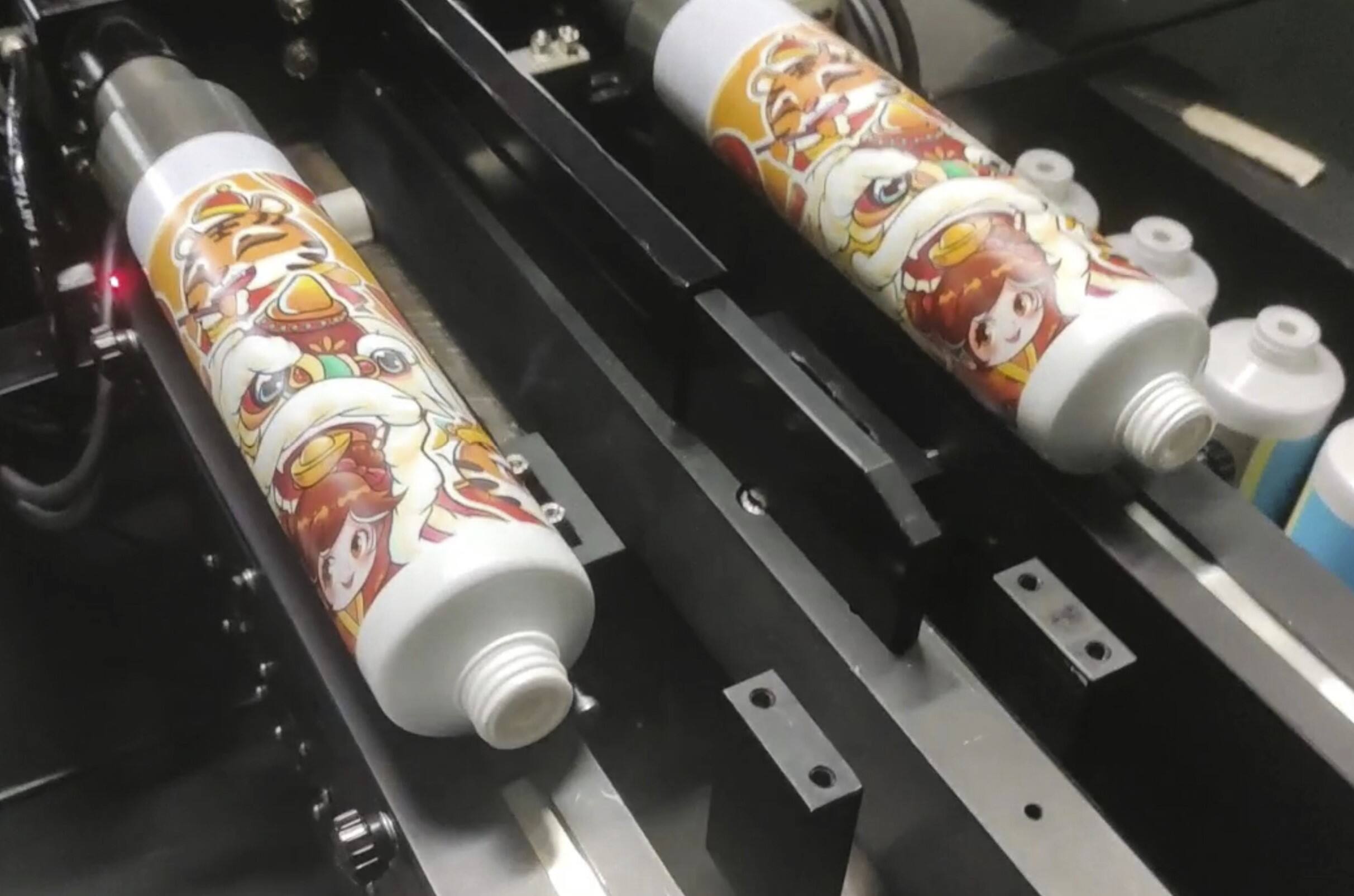
How Tubes Inkjet Printers Enable True 360° Seamless Printing
The Seam Elimination Breakthrough: Synchronized Rotation and Pixel-Perfect Droplet Timing
Getting those really smooth 360 degree prints on cylindrical items means dealing with some basic physics problems, mainly getting rid of those annoying visible lines that show up when ink drops don't line up properly as the object spins. Today's tube inkjet systems tackle this issue using two key technologies working together: finely tuned spinning mechanisms and incredibly fast inkjet response times. When these tubes spin at around 120 revolutions per minute, the print heads shoot out ink droplets with about plus or minus 0.1 millisecond accuracy, so every single dot hits exactly where it needs to be for uninterrupted images. This level of control stops those ugly bands and color mismatches at pattern junctions. Special sensors check the tube's position 500 times each second, sending live updates to motion controls that tweak the spinning speed as needed to keep dots aligned, even if the container size changes slightly. What we end up with are pictures that look almost like photographs, with no telltale starting or ending points. This makes it possible to apply intricate gradients and tiny text that wraps neatly around both straight sided and tapered containers without breaking continuity.
Core Engineering: Integrated Encoder Feedback, Variable-Speed Spindle Control, and UV-Curable Ink Jetting
Industrial grade tube inkjet printers rely on three main engineering components that work together behind the scenes. Optical encoders keep track of where each tube is positioned down to 0.01 degrees accuracy. This lets the motion control system make adjustments on the fly when there are any wobbles or irregularities in rotation. For the second part, servo driven spindles handle both grip pressure and spinning speed automatically depending on what size tube comes through (from 15mm up to 120mm) and how heavy the material is. They maintain steady contact speed beneath the print heads so images don't get distorted when speeds change up or down. The third component involves UV LED curing units that harden special inks almost instantly after they're applied. According to ASTM D3359 tests, these achieve around 95% adhesion in just 0.3 seconds. Because the ink sets so fast, there's no spreading or blooming of dots, keeping those fine details sharp even below 0.1mm resolution. And best of all, this setup results in less than 0.25% waste when running at 60 tubes per minute. That beats traditional pad printing methods hands down, which usually end up with between 8% and 12% defects.
Optimizing Tubes Inkjet Printer Performance Across Substrate Types
Plastic, Metal-Laminated, and Composite Tubes: Surface Energy and Adhesion Protocols
Getting consistent print results on different materials means we need specific prep work for each substrate type. Plastic tubes made from PET or PVC naturally repel water, so printers often see ink forming beads instead of spreading out properly unless they activate the surface first. Metal laminates create another challenge because they don't absorb anything, while composites throw everything off with their mixed surface energies. To fix this, most shops use pre-treatment methods like plasma activation or UV primers that boost surface tension from below 35 dynes per centimeter up past 50 dynes per centimeter, allowing ink to spread evenly. When dealing with metals specifically, printers tend to go with thicker UV curable inks since regular ones separate too much when cured quickly. Composites demand extra attention though - usually needing two steps: activating the plastic parts to make them water friendly and etching the metal sections at microscopic level. With these customized treatments, most facilities achieve around 98% adhesion strength across all materials tested, which satisfies the ISO Class 4 requirements for good bonding.
Curvature Compensation: Diameter Ranges (15–120 mm) and Dynamic Z-Axis Adjustment
Keeping print quality consistent when dealing with different sized tubes depends heavily on adjusting for curves as they happen. Modern inkjet systems for tubes incorporate laser sensors that check the distance from the surface up to 1000 times every second. These readings let the printer automatically adjust the position of the nozzles with incredible accuracy down to about 0.2 millimeters. The result? No annoying smudges or blurry spots on those tiny tubes under 3 centimeters in diameter, while bigger tubes over 8 centimeters get cleaner prints without excessive ink bleeding. This kind of smart adjustment makes all the difference in producing sharp, professional looking labels regardless of the container size.
| Diameter Range (mm) | Z-Axis Tolerance | Compensation Algorithm |
|---|---|---|
| 15–30 | ±0.05 mm | High-frequency micro-adjustments |
| 31–60 | ±0.1 mm | Adaptive curvature mapping |
| 61–120 | ±0.15 mm | Gradient-based interpolation |
This dynamic system preserves <1% dimensional error across production runs—eliminating visible banding even at native 1200 dpi resolution.
Seamless Printing Modes Compared: Helical, Single-Pass, and Multi-Pass for Production Scalability
Speed-Resolution Trade-Offs: When to Choose Each Mode for High-Yield Tubes Inkjet Printer Deployment
Selecting the optimal printing mode directly impacts throughput, quality, and cost-efficiency in tubular packaging production:
- Helical Mode: Balances speed (up to 120 units/minute) and resolution (300–1200 dpi) via interlaced droplet placement. Ideal for mid-volume cosmetic tubes requiring moderate curvature compensation and design flexibility.
- Single-Pass: Maximizes output (200+ units/minute) but carries higher risk of visible banding from nozzle inconsistencies. Best suited for high-volume pharmaceutical tubes with simple, low-resolution graphics where sub-600 dpi is acceptable.
- Multi-Pass: Delivers photorealistic fidelity (1200+ dpi) but reduces throughput by ~40% versus helical mode. Reserved for luxury packaging demanding fine gradients, halftones, and brand-critical detail.
Production volume guides ROI: Single-pass delivers strongest economics for runs exceeding 50,000 units; helical mode optimizes batches of 5,000–50,000; and multi-pass justifies slower cycle times for sub-5,000 premium or limited-edition orders. In single-pass deployments, routine nozzle health monitoring is essential—unaddressed clogs can push defect rates above 15%.
Real-World ROI: Case Study – UV Tubes Inkjet Printer in Cosmetic Tube Manufacturing
When a major cosmetics brand switched from old school offset printing to a new UV tube inkjet system, they got their money back in just over a year. Getting rid of those expensive printing plates saved them a bundle, and changeovers between different products now take only 15% of what they used to. For the first time ever, small batch custom prints actually made sense financially. The company saw material waste drop by 40% because the ink was applied so precisely and cured instantly under UV light. Print errors also went down 30% since the printer doesn't touch the surface during printing. Design teams can now tweak packaging designs overnight and get samples ready for seasonal collections in just 24 hours. The system handles tubes of all sizes from tiny 20mm containers up to big 110mm jars without needing any special setup changes. All these improvements added up to around $220k saved each year and helped boost their presence in the luxury skincare market by about 15 percentage points.
FAQ
What are the key technologies used in tube inkjet printers to ensure 360° seamless printing?
Tube inkjet printers use finely tuned spinning mechanisms and fast inkjet response times to synchronize rotation and droplet timing, eliminating visible seams.
How do tube inkjet printers handle different substrate types?
Treatments like plasma activation and UV primers are used to boost surface tension, enabling consistent ink adhesion on materials like plastic, metal, and composites.
What printing modes are available for tube inkjet printers?
There are three modes: helical, single-pass, and multi-pass, each offering different speed and resolution trade-offs suitable for various production needs.
How did UV tube inkjet printers affect cosmetic tube manufacturing ROI?
Switching to UV tube inkjet printers resulted in reduced waste, faster changeovers, and significant annual savings for cosmetic manufacturers.
Table of Contents
- How Tubes Inkjet Printers Enable True 360° Seamless Printing
- Optimizing Tubes Inkjet Printer Performance Across Substrate Types
- Seamless Printing Modes Compared: Helical, Single-Pass, and Multi-Pass for Production Scalability
- Real-World ROI: Case Study – UV Tubes Inkjet Printer in Cosmetic Tube Manufacturing
- FAQ